Components for Pipedream: actions to send, read and validate an address, and an instant source that waits for status changes.
Cette page est en anglais.
Ce que vous pouvez en faire
•Write the rest of your workflow in plain Node with these steps in between.
•Have the source start the workflow the moment a letter is delivered.
•Replay a run from the inspector — with an idempotency key set, that is safe.
Connexion
1Download and extract the Pipedream ZIP using Install. Follow README.md to install its four actions and status source privately with the Pipedream CLI.
2Create a test key in your SendLetter account and enter it under SendLetter API key. Choose Prepare Letter, enter both addresses and text or PDF URL, and use a stable idempotency key.
3Review the document and price. After approval, use Send Letter with the same inputs and key and map totalCents to Confirmed price in cents. Use the status source as your workflow trigger.
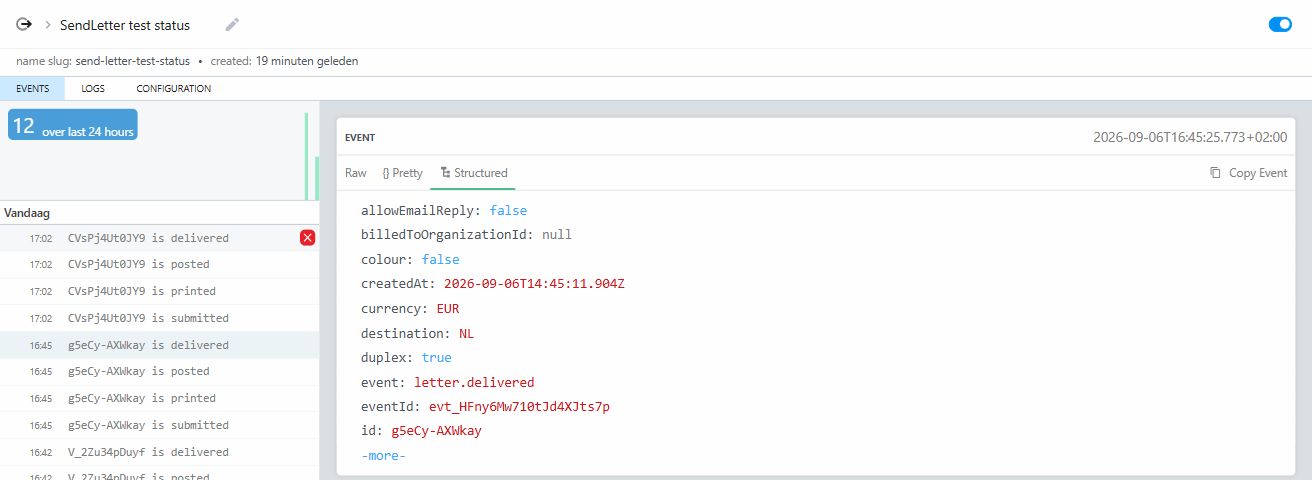
The source deduplicates on the event id rather than the letter id. Delivery is at-least-once, so keying on the letter would make every status after the first one disappear.
Examples from the tested integration
The instant source receives submitted, printed, posted and delivered for test letters. Select an event to inspect its letter ID and status.