Send return instructions, payment reminders and personal letters by post from a WooCommerce order. Write a letter or select a PDF, review the exact price and confirm before printing.
Den här sidan är på engelska.
Vad du kan göra med det
•Use the billing address from an order and check it before sending.
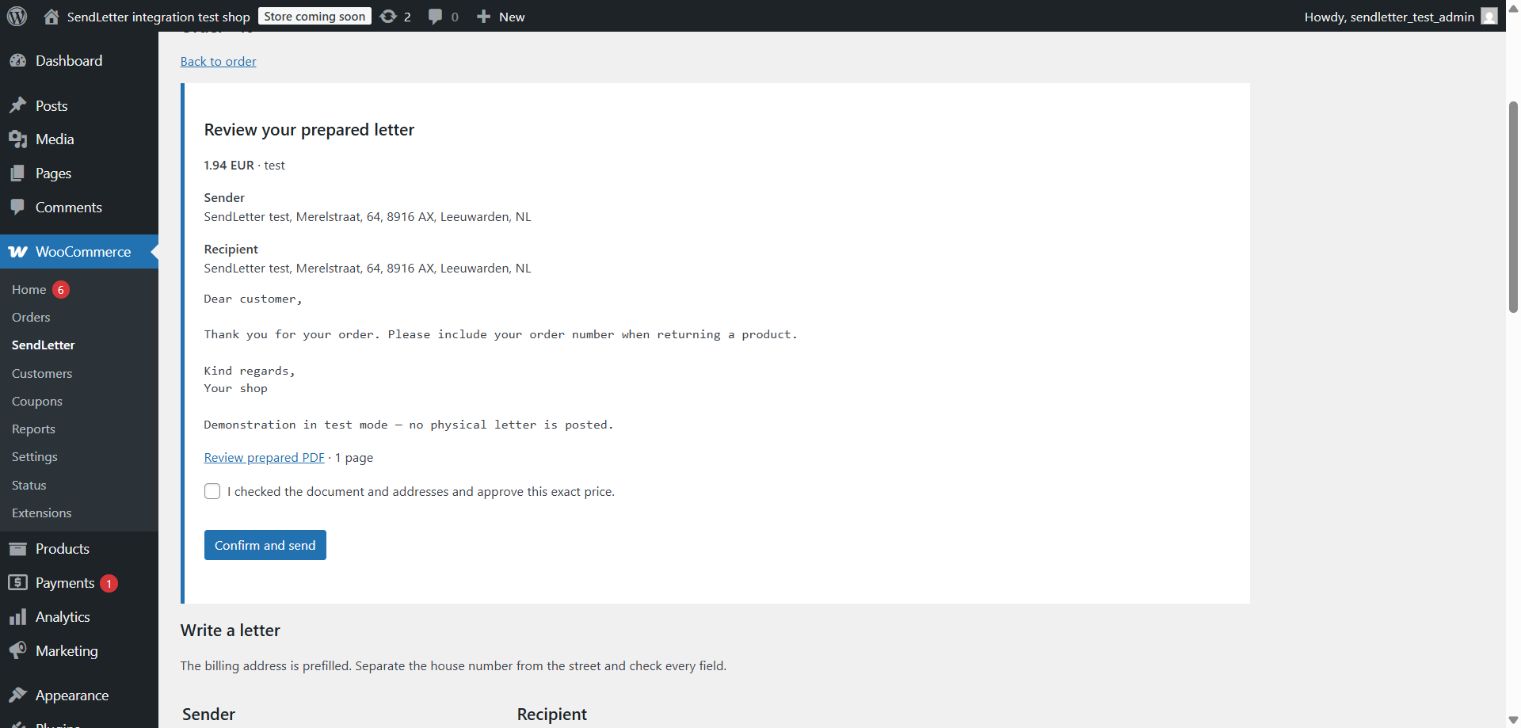
•Review the rendered PDF, page count and exact total before approving a letter.
•Keep the letter reference and delivery status in the order, with status changes in order notes.
Så kopplar du in det
1Download the SendLetter WooCommerce ZIP. In WordPress choose Plugins > Add New > Upload Plugin and activate it. WooCommerce and PHP 8.1 or later with OpenSSL are required.
2Create an API key under SendLetter account > Developer. Start with sk_test_ and allow letter read, quote, draft and send access.
3Open WooCommerce > SendLetter. Enter the key and your complete return address, then choose Save and test connection.
4Open an order and select Write or track a postal letter in the SendLetter panel. Check the prefilled billing address and put the house number in its separate field.
5Write letter text, or leave it empty and enter a direct HTTPS PDF URL. Choose printing options and select Prepare and show exact price.
6Open Review prepared PDF. Check every page, both addresses and the total. Tick approval and choose Confirm and send. A test key simulates delivery without payment or physical post.
7Use Refresh statuses to update the order immediately. WordPress scheduled tasks also check pending letters when your site receives traffic or its server cron runs.
8To send real post, replace the test key with a live key, fund your SendLetter wallet and prepare a new letter. To disconnect, use Connection and sender > Disconnect and revoke the key in SendLetter.
Reconfirming the same prepared letter returns the same reference. Status updates use WordPress scheduled checks; they are not instant webhooks. The download includes the full English and Dutch guide.
Examples from the tested integration
Review the prepared letter, exact price and PDF before ticking approval. This WordPress example uses test mode and posts nothing.